Cold email your code and AI agents can run.
Everything you can do in the app, you can do through the API: connect mailboxes, import contacts, launch campaigns, send single emails and answer replies. Or let your AI agent do it through our MCP server.
curl -X POST https://api.yourdomain.com/v1/emails \
  -H "Authorization: Bearer gtm_..." \
  -H "Idempotency-Key: intro-ana-2026-11-02" \
  -H "content-type: application/json" \
  -d '{
    "to": "[email protected]",
    "subject": "Quick question, {{first_name|there}}",
    "body": "Hi Ana,\n\nSaw you are hiring SDRs...",
    "variables": { "first_name": "Ana" }
  }'

# 201 {"id":"...","status":"sent","from":"[email protected]","sentToday":12}
const res = await fetch("https://api.yourdomain.com/v1/emails", {
method: "POST",
headers: {
Authorization: "Bearer " + process.env.GTM_KEY,
"Idempotency-Key": "intro-ana-2026-11-02",
"content-type": "application/json",
},
body: JSON.stringify({
to: "[email protected]",
subject: "Quick question, {{first_name|there}}",
body: "Hi Ana,\n\nSaw you are hiring SDRs...",
}),
});
const email = await res.json(); // { id, status: "sent", from, sentToday }import os, requests
r = requests.post(
"https://api.yourdomain.com/v1/emails",
headers={
"Authorization": f"Bearer {os.environ['GTM_KEY']}",
"Idempotency-Key": "intro-ana-2026-11-02",
},
json={
"to": "[email protected]",
"subject": "Quick question, {{first_name|there}}",
"body": "Hi Ana,\n\nSaw you are hiring SDRs...",
},
)
print(r.json()) # {'id': ..., 'status': 'sent', ...}The whole product, as an API.
REST over HTTPS. JSON in, JSON out. Clear error messages a person or an agent can act on.
Mailboxes
Connect SMTP/IMAP or Microsoft mailboxes, set limits, check DNS, send tests.
GET /mailboxesPOST /mailboxes/smtpPATCH /mailboxes/:idPOST /mailboxes/:id/check-dns
Contacts
Import rows, files or Google Sheets, search, and manage the blocklist.
POST /contacts/importGET /contactsPOST /blocklist
Campaigns
Create, check, preview, test, launch, pause and edit sequences.
POST /campaignsGET /campaigns/:id/checkPOST /campaigns/:id/testPOST /campaigns/:id/launch
Single emails
Send one email from a mailbox, with tracking and idempotency.
POST /emailsGET /emails/:id
Inbox
Read conversations, reply in the thread, label, snooze and save drafts.
GET /inboxPOST /inbox/:id/replyPATCH /inbox/:id
Account
Workspaces, team, limits, webhooks and API keys.
GET /limitsPOST /webhooksPOST /api-keys
Safe for automation by design.
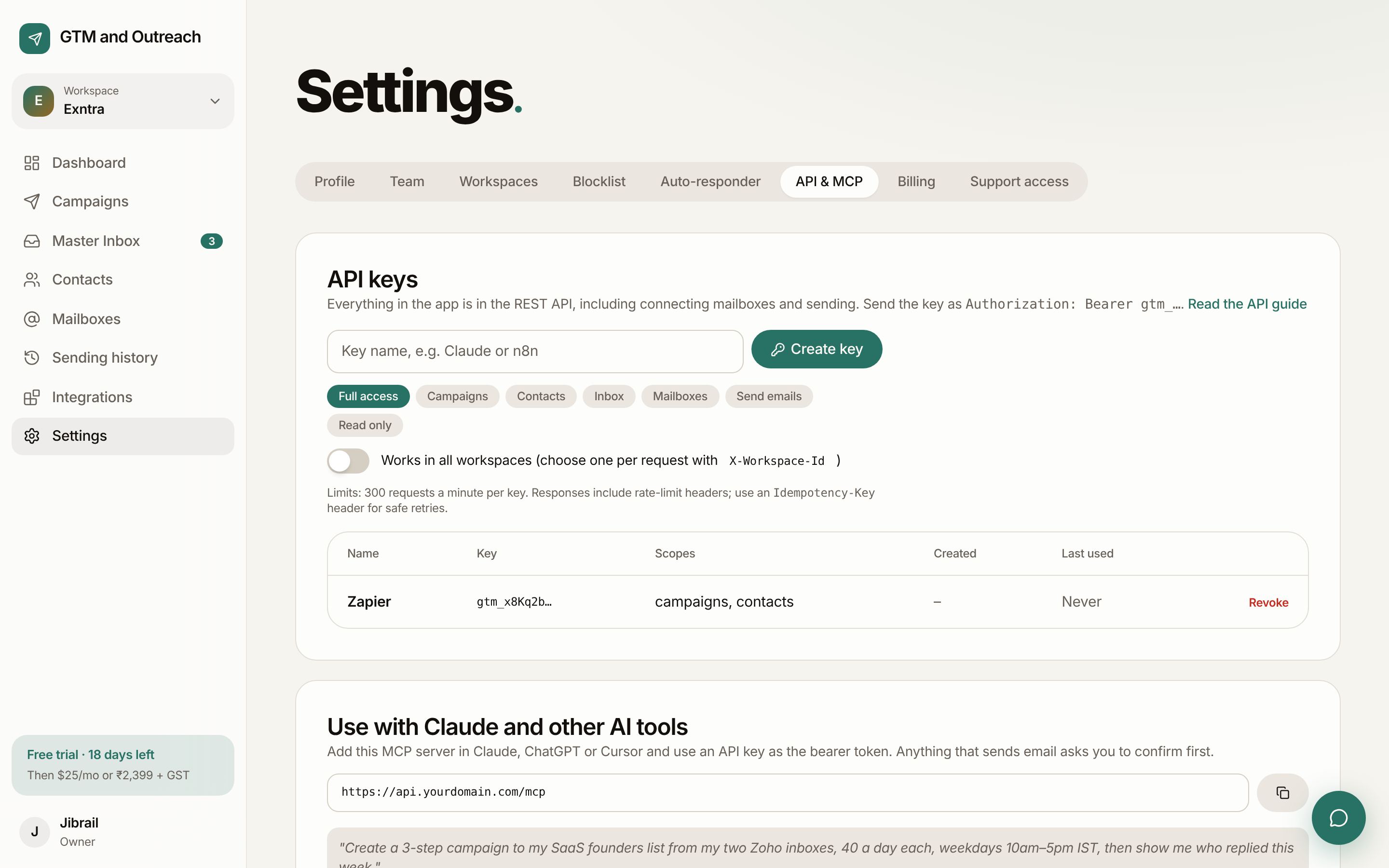
- Scoped keysFull access, or only campaigns, contacts, inbox, mailboxes, sending or read-only. One workspace or the whole account.
- Rate limits you can see300 requests a minute per key and 1,200 per account, with headers on every response and
Retry-Afteron 429. - Safe retriesSend an
Idempotency-Keyand a repeated request returns the first result instead of sending twice. - Same rules as the appBlocklist, bounce limits, slow start and daily caps apply to every API call. Check them any time with
GET /limits.
Webhooks for everything that happens.
Get a signed POST the moment something happens. Verify it with the HMAC-SHA256 signature in X-GTM-Signature. Failed deliveries retry with backoff.
email.sentemail.openedemail.clickedemail.repliedemail.bouncedcontact.unsubscribedlead.labelledcampaign.pausedcampaign.completedmailbox.disconnectedmailbox.pausedaccount.sending_held
Docs for people and for machines.
Full reference
Every endpoint, field and limit, served by your API at /v1/docs.
For AI assistants
The same reference as plain text at /llms.txt on the API, so any model can read it.
Get your API key today.
Start your free month, open Settings, then API & MCP, and create a key. The API is included in the one plan.